ScraperGuard
Production-grade observability and reliability layer for web scraping pipelines — detects when scrapers silently break and explains why.
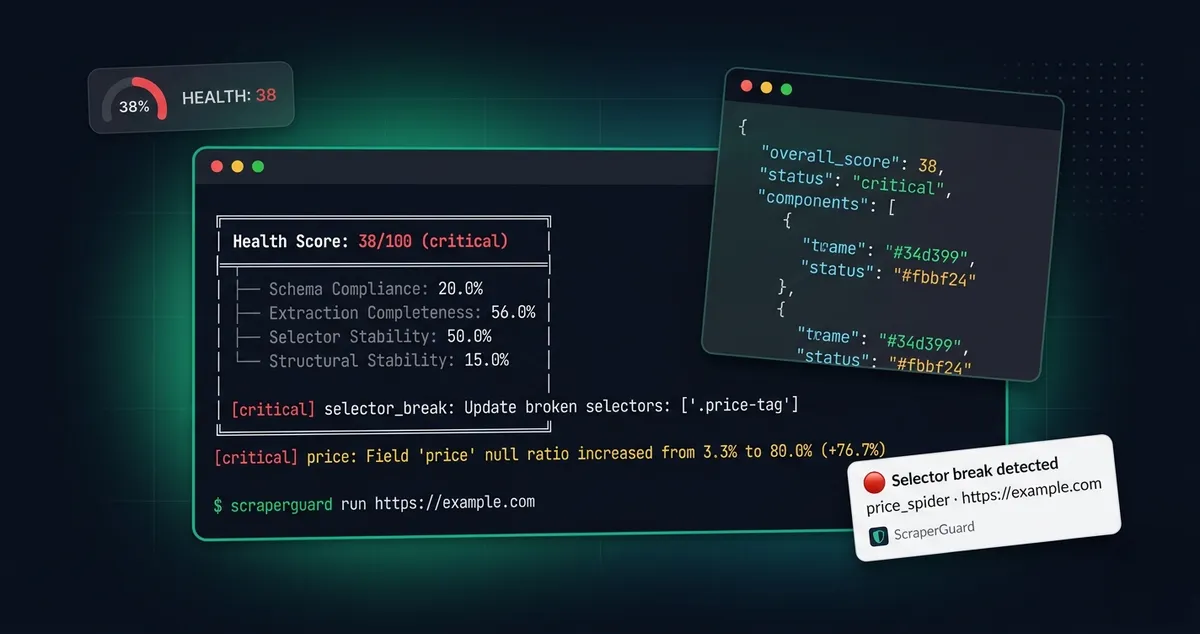
One-Liner
Production-grade observability and reliability layer for web scraping pipelines — detects when scrapers silently break and explains why.
The Problem It Solves
Web scrapers don’t crash. They silently drift.
A scraper returns HTTP 200 on every request. The job scheduler shows green. No exceptions in the logs. But the site changed a CSS class three days ago, and 80% of your price data has been null ever since. Your pipeline is writing corrupted rows to the database, downstream reports are wrong, and nobody knows until someone manually spots the bad numbers.
This happens because existing monitoring tracks the scraper (did the job run?), not the data (is the output correct?). HTTP status codes are not a data quality signal. ScraperGuard fills that gap.
ScraperGuard sits between the scraper and the database and answers: “Is the data still correct — and if not, what broke and why?”
Who It’s For
- Data engineers running scrapers that feed databases, warehouses, or analytics systems
- Scraping teams managing 10-500+ spiders and needing centralized quality metrics
- ML engineers using scraped data for training sets and needing schema guarantees
- Solo developers building price monitors, aggregators, or competitive intelligence tools who can’t afford to manually check output daily
- Anyone who has spent 8 hours debugging why their scraper’s data went bad and wants that to be 5 minutes instead
Core Philosophy
1. Monitor the data, not the scraper. Job completion is not a correctness signal. Schema compliance, null ratios, and selector stability are.
2. Observe, don’t intercept. ScraperGuard never modifies your pipeline’s data flow. It watches, analyzes, and reports. If ScraperGuard has a bug, the worst outcome is a wrong health score — never a crashed pipeline or filtered data.
3. Diagnose, don’t just detect. “Scraper failed” is useless. “Selector .price-tag broke because the site replaced <span class="price-tag"> with <div data-price> — SELECTOR_BREAK, 90% confidence” tells you what to fix.
4. Rule-based, not ML. Failure classification is deterministic, debuggable, and testable. Every classification can be traced to the exact signals that triggered it. ML can be layered on later for edge cases.
5. Zero-config defaults. SQLite storage, sensible thresholds, one pip install and one CLI command to see results. No database server, no infrastructure setup.
Tech Stack
| Layer | Technology | Why |
|---|---|---|
| Language | Python 3.11+ | Ecosystem alignment — scrapers are Python |
| HTML Parsing | lxml | Fastest Python HTML parser, deterministic |
| Schema Validation | Pydantic v2 | Rust-core performance, native Python schemas |
| Storage | SQLite (WAL mode) | Zero setup, travels with project, sufficient for run-level writes |
| CLI | Click | Standard Python CLI framework |
| API | FastAPI | Async, auto-documented, production-ready |
| Alerting | Slack, Email (SMTP), Webhook | Covers most team workflows |
| Config | YAML + env var interpolation | 12-factor compatible |
| CI | GitHub Actions | Python 3.11 + 3.12, ruff, mypy |
| Packaging | Docker + pip | Both supported |
Architecture Overview
┌─────────────────────────────────────┐ │ Your Scraper │ │ (Scrapy / Playwright / Custom) │ └──────────────┬──────────────────────┘ │ ▼ ┌──────────────────────────────────────┐ │ Observer Layer │ │ ┌────────────┐ ┌────────────────┐ │ │ │ Scrapy │ │ Playwright │ │ │ │ Middleware │ │ Page Observer │ │ │ └─────┬──────┘ └──────┬─────────┘ │ │ └────────┬───────┘ │ └─────────────────┼────────────────────┘ │ ▼ ┌─────────────────────────────────────────────────────────┐ │ Core Engine │ │ │ │ ┌───────────────┐ ┌───────────────┐ ┌─────────────┐ │ │ │ Snapshot │ │ Schema │ │ DOM Diff │ │ │ │ Engine │ │ Validator │ │ Engine │ │ │ │ │ │ │ │ │ │ │ │ • Normalize │ │ • Pydantic │ │ • Tree diff │ │ │ │ • Fingerprint │ │ • Null drift │ │ • Selector │ │ │ │ • Metadata │ │ • Range/type │ │ tracking │ │ │ └──────┬────────┘ └──────┬────────┘ └──────┬──────┘ │ │ └────────┬─────────┴────────┬─────────┘ │ │ ▼ ▼ │ │ ┌───────────────────┐ ┌──────────────────────────┐ │ │ │ Drift Detection │ │ Failure Classifier │ │ │ │ • Null baselines │ │ • 8 failure types │ │ │ │ • Historical │ │ • Confidence scoring │ │ │ │ comparison │ │ • Root-cause attribution │ │ │ └────────┬──────────┘ └───────────┬──────────────┘ │ │ └───────────┬─────────────┘ │ └────────────────────────┼────────────────────────────────┘ │ ┌───────────┼───────────┐ ▼ ▼ ▼ ┌────────────┐ ┌───────────┐ ┌───────────────┐ │ Storage │ │ Alerting │ │ API / CLI │ │ SQLite │ │ Slack │ │ FastAPI │ │ │ │ Email │ │ 5 commands │ │ │ │ Webhook │ │ 9 endpoints │ └────────────┘ └───────────┘ └───────────────┘Data flow: Scraper output → Observer captures HTML + items + metadata → Snapshot engine normalizes and fingerprints → Schema validator checks data + computes null ratios → DOM differ compares structures (if fingerprint changed) → Drift detector compares against baselines → Failure classifier maps signals to root causes → Health score aggregates everything → Alerts fire if thresholds breached → Reports available via CLI/API.
The entire pipeline runs after the scraper finishes. In Scrapy, it runs in close_spider. In Playwright, it runs on context manager exit. The scraper’s own execution is never affected.
Key Modules
1. Snapshot Engine (core/snapshot/)
Normalizer — Strips scripts, styles, comments, event handlers, tracking attributes, inline styles from raw HTML using lxml. Produces a deterministic canonical DOM tree.
Fingerprinter — Computes two SHA-256 hashes per snapshot:
- Content fingerprint: Hash of full normalized HTML. Changes with any content change.
- Structural fingerprint: Hash of tag-nesting skeleton only (ignoring text/attribute values). Changes only when DOM structure changes. This gates whether the diff engine runs.
Capture — Bundles normalized HTML, fingerprints, extracted items, and metadata (URL, timestamp, latency, response size, HTTP status) into a Snapshot object stored via the storage backend.
2. Schema Validation Engine (core/schema/)
BaseSchema — Pydantic v2 model that users subclass. validate_batch(items) validates every item and returns a ValidationResult with pass/fail counts, null ratios per field, and detailed error breakdowns.
Validators — Helper functions wrapping Pydantic Field constraints:
validators.range(min=, max=)— Numeric boundsvalidators.pattern(regex)— String pattern matchingvalidators.cardinality(min=, max=)— List length constraintsvalidators.not_null()— Explicit non-null enforcement
Null Drift Detection (core/schema/drift.py) — Compares current null ratios against historical baseline (average of last N runs). Severity: critical (delta > 0.5), warning (delta > 0.3), info (delta > 0.15).
3. DOM Diff Engine (core/dom_diff/)
Parser — Converts normalized HTML to a lightweight tree representation for comparison.
Differ — Recursive tree comparison with greedy child matching by tag+class similarity. Detects 7 change types: NODE_REMOVED, NODE_ADDED, NODE_MOVED, TAG_CHANGED, ATTRIBUTES_CHANGED, CHILDREN_REORDERED, TEXT_CHANGED. Each change includes a CSS path, severity level (high/medium/low), and descriptive message.
Selector Tracker — For each user-specified CSS selector, counts matches in both the current and previous snapshots. Reports status: stable, broken (went from N→0), degraded (decreased), improved (increased).
4. Failure Classifier (core/classify/)
Rule-based, deterministic. Examines validation results, DOM changes, selector statuses, and HTTP metadata to classify failures into 8 types:
| Type | Key Signal |
|---|---|
SELECTOR_BREAK | Selector match count → 0, page loaded fine |
DOM_RESTRUCTURE | ≥5 high-severity DOM changes or ≥3 node removals |
CAPTCHA_INJECTION | reCAPTCHA, hCaptcha, Cloudflare Turnstile signatures in body |
JS_CHALLENGE | <50 chars visible text + script tags present |
RATE_LIMIT | HTTP 429/403 or rate-limit text patterns |
AB_VARIANT | 30-99% selector breakage + moderate DOM changes |
PARTIAL_EXTRACTION | Some items valid, some fail, not majority |
EMPTY_RESPONSE | Response body <100 bytes or None |
Each classification includes confidence (0.0-1.0), severity, evidence list, and a recommended action string. Multiple classifications can coexist per run.
5. Health Score Engine (health.py)
Four-component weighted score (0-100):
| Component | Weight | Source |
|---|---|---|
| Schema Compliance | 30% | passed_count / total_items |
| Extraction Completeness | 30% | 60% avg field completeness + 40% worst-field penalty |
| Selector Stability | 25% | stable+improved / total tracked selectors |
| Structural Stability | 15% | 1.0 minus severity-weighted deductions (high=-0.25, medium=-0.10, low=-0.03) |
Status thresholds: healthy (≥80), degraded (≥50), critical (<50).
6. Integrations (integrations/)
Scrapy: ObserverMiddleware (downloader middleware, captures responses) + ValidationPipeline (item pipeline, buffers items, runs full analysis in close_spider). Custom signals: scraperguard_health_computed, scraperguard_drift_detected, scraperguard_selector_broken.
Playwright: observe() async context manager wraps page interaction, runs analysis on exit. capture_page() one-shot convenience function.
7. Storage (storage/)
Abstract StorageBackend interface with SQLiteBackend implementation. Methods: save_snapshot, get_snapshot_by_id, list_snapshots, save_validation_result, get_validation_results, save_run, get_run, list_runs. SQLite uses WAL mode for concurrent read performance.
8. Alerting (alerts/)
AlertDispatcher routes alerts to configured channels. SlackDispatcher (Block Kit via webhook), EmailDispatcher (SMTP with TLS), WebhookDispatcher (JSON POST). Fires when health score or severity thresholds are breached, configurable via YAML.
9. API (api/)
FastAPI application factory with 9 REST endpoints: /api/health, /api/runs, /api/runs/{id}, /api/snapshots, /api/snapshots/{id}, /api/validation/{url}, /api/drift/{url}, /api/report/{run_id}, /api/selectors/{url}. Auto-generated OpenAPI docs at /docs.
10. CLI (cli/)
Click-based with 5 commands: run (full pipeline), validate (schema check), diff (structural comparison), report (health report in text/json/csv), serve (start FastAPI server).
API Surface Summary
Python API
# Schema definitionfrom scraperguard.schema import BaseSchema, validators
class ProductSchema(BaseSchema):    title: str    price: float = validators.range(min=0.01)    rating: float = validators.range(min=0, max=5)
# Batch validationresult = ProductSchema.validate_batch(items, run_id="run-001", url="https://example.com")# → ValidationResult(total_items=30, passed=28, failed=2, null_ratios={...})
# Snapshot capturefrom scraperguard.core.snapshot import capture_snapshot, normalize_htmlsnapshot = capture_snapshot(html, items, url="...", run_id="...")
# DOM diffingfrom scraperguard.core.dom_diff import diff_trees, parse_to_treechanges = diff_trees(before_html, after_html)
# Failure classificationfrom scraperguard.core.classify import classify_failure, FailureTypeclassifications = classify_failure(context)
# Health scoringfrom scraperguard.health import compute_health_score, format_health_reportreport = compute_health_score(validation_result, selector_results, dom_changes)print(format_health_report(report))
# Storagefrom scraperguard.storage.sqlite import SQLiteBackendstorage = SQLiteBackend("scraperguard.db")
# Configfrom scraperguard.config import load_configconfig = load_config("scraperguard.yaml")
End-to-End Python Example
This example demonstrates every major ScraperGuard capability in one script:
#!/usr/bin/env python3"""Complete ScraperGuard demo — schema validation, DOM diffing,failure classification, and health scoring."""
from datetime import datetime, timezonefrom scraperguard.core.classify.classifier import ClassificationInput, classify_failurefrom scraperguard.core.dom_diff.differ import diff_treesfrom scraperguard.core.dom_diff.parser import parse_to_treefrom scraperguard.core.dom_diff.selector_tracker import track_selectorsfrom scraperguard.core.schema.base import BaseSchemafrom scraperguard.core.schema.validators import validatorsfrom scraperguard.core.schema.drift import detect_null_driftfrom scraperguard.core.snapshot.capture import capture_snapshotfrom scraperguard.core.snapshot.normalizer import normalize_htmlfrom scraperguard.core.snapshot.fingerprint import fingerprint_structurefrom scraperguard.health import compute_health_score, format_health_reportfrom scraperguard.storage.models import SnapshotMetadatafrom scraperguard.storage.sqlite import SQLiteBackend
# 1. Define your data schemaclass ProductSchema(BaseSchema):    title: str    price: float = validators.range(min=0.01)    availability: bool    rating: float = validators.range(min=0, max=5)
# 2. Set up storagestorage = SQLiteBackend("demo.db")run = storage.create_run("product_monitor")
# 3. Simulate a scraper runhtml = """<html><body>  <div class="product">    <h1 class="title">Widget Pro</h1>    <span class="price">29.99</span>  </div>  <div class="product">    <h1 class="title">Gadget X</h1>    <span class="price"></span>  </div></body></html>"""
items = [    {"title": "Widget Pro", "price": 29.99, "availability": True, "rating": 4.5},    {"title": "Gadget X", "price": None, "availability": False, "rating": 3.2},    {"title": "Thingamajig", "price": 15.00, "availability": True, "rating": 4.0},    {"title": "Doohickey", "price": None, "availability": True, "rating": None},]
# 4. Capture snapshotmetadata = SnapshotMetadata(    http_status=200, latency_ms=123.4,    timestamp=datetime.now(timezone.utc),    headers={"content-type": "text/html"},    response_size_bytes=len(html.encode()),)snapshot = capture_snapshot(    url="https://example.com/products",    raw_html=html, extracted_items=items,    metadata=metadata, storage=storage, run_id=run.id,)
# 5. Validate itemsresult = ProductSchema.validate_batch(    items, run_id=run.id, url="https://example.com/products")print(f"Validation: {result.passed_count}/{result.total_items} passed")print(f"Null ratios: {result.null_ratios}")
# 6. Track selectorstree = parse_to_tree(snapshot.normalized_html)statuses = track_selectors(tree, None, [".product", ".price", ".title"])for s in statuses:    print(f"  [{s.status}] {s.selector}: {s.current_matches} matches")
# 7. Classify failuresclassifications = classify_failure(ClassificationInput(    validation_result=result, dom_changes=[], selector_statuses=statuses,    raw_html=html, http_status=200, response_size_bytes=len(html.encode()),))
# 8. Health scorereport = compute_health_score(    validation_result=result, selector_statuses=statuses,    dom_changes=[], classifications=classifications,    drift_events=[], run_id=run.id, url="https://example.com/products",)print(format_health_report(report))
Scrapy Integration (2 lines in settings.py)
DOWNLOADER_MIDDLEWARES = { "scraperguard.integrations.scrapy.ObserverMiddleware": 543,}ITEM_PIPELINES = { "scraperguard.integrations.scrapy.ValidationPipeline": 300,}SCRAPERGUARD_SCHEMA = "myproject.schemas.ProductSchema"Playwright Integration
from scraperguard.integrations.playwright import observe, capture_page
# Context manager (wraps page interaction)async with observe(page, storage=storage, run_id=run_id, schema=ProductSchema) as observer:    await page.goto(url)    data = await extract(page)    observer.set_items(data)
# One-shot conveniencereport = await capture_page(page, storage=storage, run_id=run_id, items=data, schema=ProductSchema)print(report.overall_score)
CLI
scraperguard run https://example.com --schema product_schema.py --selectors ".price,.title"scraperguard validate --url https://example.com --schema product_schema.pyscraperguard diff --url https://example.com --last 2scraperguard report --url https://example.com --format jsonscraperguard serve --host 0.0.0.0 --port 8000REST API
GET /api/health → System health overviewGET /api/runs → List all runsGET /api/runs/{id} → Run detailGET /api/snapshots → List snapshotsGET /api/snapshots/{id} → Snapshot detailGET /api/validation/{url} → Validation history for URLGET /api/drift/{url} → Drift events for URLGET /api/report/{run_id} → Full health report for runGET /api/selectors/{url} → Selector tracking historyKey Technical Challenges
1. Deterministic HTML normalization. Real-world HTML is messy — inconsistent whitespace, dynamic attributes, tracking scripts, inline styles. The normalizer must produce identical output for semantically identical pages across runs. Solved with lxml-based parsing, aggressive noise stripping, and whitespace collapsing.
2. Structural fingerprinting without false positives. Price text changing from “$79” to “$80” should NOT trigger a structural diff. Solved with dual fingerprinting — content hash for “did anything change?” and structural hash (tag skeleton only) for “should I diff?”
3. Tree matching without index assumptions. If a site inserts a banner at the top, naive index-based comparison thinks every element changed. Solved with greedy similarity matching by tag+class, with a 0.3 similarity threshold.
4. Drift baseline that excludes the current run. If you save the current validation result to storage before computing the baseline, the current run pollutes its own baseline. The drift detector must run before the current result is persisted.
5. Fault-tolerant observer pattern. ScraperGuard must never crash the scraper. All analysis is wrapped in try/except with internal error logging. If the health score computation throws an exception, the scraper continues unaffected.
Performance Characteristics
- Normalization: ~2-5ms per page for typical product pages (lxml C-extension performance)
- Fingerprinting: <1ms per snapshot (SHA-256 of already-normalized string)
- Schema validation: Pydantic v2 Rust core — validates thousands of items per second. 30 items in <1ms.
- DOM diffing: Depends on tree size. Typical product pages (200-500 nodes): 5-15ms. Large pages (2000+ nodes): 50-100ms.
- Selector tracking: lxml cssselect — <1ms per selector for typical pages.
- Full pipeline (normalize → validate → diff → classify → score): 10-50ms for a typical run.
- Storage overhead: SQLite writes per run, not per item. ~1KB per snapshot, ~500B per validation result. Negligible at scraping scale.
- Memory: Holds two DOM trees in memory during diffing (current + previous). ~2-10MB per page. Released after each run.
- Test suite: 212 tests execute in ~2.3 seconds.
ScraperGuard is designed for run-level analysis, not request-level. It analyzes the output of a scraper run after it completes. This means overhead is amortized across the entire run, not added to every HTTP request.
Storage Footprint
| Data | Size Per Record | Notes |
|---|---|---|
| Snapshot (normalized HTML) | ~1 KB | Typical product page after stripping scripts/styles/comments |
| Snapshot (raw HTML, optional) | ~10-50 KB | Only stored if store_raw_html: true (off by default) |
| Validation result | ~500 B | Pass/fail counts, null ratios, field failures as JSON |
| Run metadata | ~200 B | Scraper name, timestamp, config, status |
| Daily total (200 runs × 10 URLs) | ~60 MB/month | With raw HTML disabled (default) |
| Daily total (200 runs × 10 URLs) | ~600 MB/month | With raw HTML enabled |
The SQLite database is a single file that travels with the project. At typical scraping scale, storage is negligible. For large-scale operations (500+ runs/day, 100+ URLs), PostgreSQL is recommended (v1.1 roadmap).
Limitations
Currently SQLite only. PostgreSQL and JSONL backends are stubbed but not implemented. Teams needing multi-worker or centralized storage should wait for v1.1 or contribute.
No historical drift tracking (time-series). The DriftTracker module for field stability scores, selector lifespans, and domain volatility is planned for v1.1. Current drift detection compares against a rolling average of recent runs — effective but not as rich as full time-series analysis.
No dashboard UI. Health data is accessible via CLI and REST API. A web dashboard with drift charts and per-scraper views is on the v1.2 roadmap.
Scrapy/Playwright required for integration. The middleware and observer are specific to these frameworks. For custom scrapers, the CLI and Python API work with any scraper that can produce HTML + JSON, but there’s no generic “hook” framework yet.
No selector auto-repair. ScraperGuard tells you WHICH selector broke and WHERE the old element moved (via DOM diff). It does not suggest replacement selectors. Planned for v2.0.
English-centric CAPTCHA detection. Known signatures include reCAPTCHA, hCaptcha, and Cloudflare, but detection is based on English text patterns. May miss region-specific anti-bot systems.
Single-process design. The current architecture assumes one ScraperGuard instance per scraper process. Distributed coordination across multiple workers requires the PostgreSQL backend (v1.1).
Comparison vs. Alternatives
There is no direct equivalent to ScraperGuard. The closest alternatives are manual approaches or general-purpose data quality tools:
| Approach | Detects Data Issues? | Explains Why? | Scraper-Specific? | Setup Effort |
|---|---|---|---|---|
| Manual spot-checking | Sometimes | No | N/A | None |
| Custom validation scripts | Yes | Partially | If you build it | High (per scraper) |
| Great Expectations | Yes (schema) | No (no DOM awareness) | No | Medium |
| dbt tests | Yes (post-warehouse) | No | No | Medium |
| Sentry / error tracking | Crashes only | Yes (for crashes) | No | Low |
| ScraperGuard | Yes (schema + structure) | Yes (root-cause classification) | Yes (Scrapy/Playwright native) | Low (2-line integration) |
Why ScraperGuard is different:
- It’s the only tool that combines data validation (schema, null drift) with structural monitoring (DOM diffing, selector tracking) and root-cause attribution (failure classification).
- General data quality tools (Great Expectations, dbt) work at the warehouse level. They don’t see the HTML. They can tell you the data is wrong but can’t tell you the selector broke because the site changed a CSS class.
- Error tracking (Sentry) catches crashes, not silent failures. Scrapers that return bad data don’t throw exceptions.
- Custom scripts work but aren’t reusable. ScraperGuard is a library you configure, not logic you rebuild per scraper.
Project Metrics
| Metric | Value |
|---|---|
| Test suite | 212 tests, 0 failures |
| Test execution time | ~2.3 seconds |
| Core modules | 10 (snapshot, schema, dom_diff, drift, classify, health, storage, alerts, CLI, API) |
| Failure types classified | 8 |
| DOM change types detected | 7 |
| Health score components | 4 |
| CLI commands | 5 |
| REST API endpoints | 9 |
| Lines of production code | ~4,000 |
| Lines of test code | ~3,500 |
| Dependencies (core) | 6 (lxml, pydantic, click, fastapi, uvicorn, pyyaml) |
Ethical Compliance
ScraperGuard itself does not scrape anything. It analyzes data that scrapers have already collected. It respects the ethical framework of the scraping pipeline it monitors:
- Does not make HTTP requests to target sites (the observer captures what the scraper already fetched)
- Does not bypass anti-bot measures (it detects them and classifies them as failure types)
- Does not store or transmit data to third parties
- Does not circumvent robots.txt or Terms of Service
- All data stays local (SQLite file in the project directory)
Non-Goals
ScraperGuard is deliberately narrow. These are things it does NOT do, by design:
Not a scraper. ScraperGuard does not fetch pages, extract data, or manage crawl scheduling. It observes the output of scrapers you already have. The ecosystem has plenty of extraction tools — what’s missing is the reliability layer between scraping and data consumption.
Not a data pipeline. ScraperGuard does not transform, clean, enrich, or load data. It validates and monitors. If you need ETL, use Airflow, Prefect, or dbt. ScraperGuard sits before those tools, ensuring the data going into your pipeline is correct.
Not a testing framework. ScraperGuard runs in production, against live data, on every scraper run. It’s monitoring, not testing. Tests verify your code works correctly. ScraperGuard verifies the data is still correct after the site changes underneath your working code.
Not an anti-bot bypass tool. ScraperGuard detects CAPTCHAs, JS challenges, and rate limits — it doesn’t solve them. It tells you the site is blocking you so you can respond (rotate proxies, add CAPTCHA solving, reduce rate). It never circumvents anti-bot measures.
Not a visual regression tool. ScraperGuard works at the structural DOM level, not the pixel level. It detects when a <span class="price"> becomes a <div data-price>. It does not detect when a button turns from blue to red. Use Playwright screenshots or Percy for visual regression.
When NOT to Use ScraperGuard
One-off data collection. If you’re scraping once and discarding the scraper, monitoring adds overhead without value. ScraperGuard is for scrapers that run repeatedly against the same sites.
Static data sources. If you’re consuming a well-documented, stable API with a versioned schema, you don’t need structural monitoring. APIs break with version changes (which you control), not with silent drift.
Sub-second latency requirements. ScraperGuard’s full pipeline takes 10-50ms per run. If your scraper needs to process and forward data in under 5ms per request, the overhead matters. Note: ScraperGuard runs at the run level, not per-request, so this only applies to single-page scrapers with extreme latency requirements.
Non-HTML sources. ScraperGuard’s DOM diffing and selector tracking assume HTML input. If you’re scraping JSON APIs, RSS feeds, or files, schema validation still works, but DOM-level features (diffing, fingerprinting, selector tracking) don’t apply.
Roadmap
v1.0 — Core Engine (current)
Schema validation, DOM diffing, failure classification (8 types), health scoring, CLI, Scrapy + Playwright integration, SQLite storage, alerting, FastAPI API, YAML config, Docker, CI.
v1.1 — Storage & Schema
PostgreSQL backend, JSONL export, JSON Schema support, selector replacement suggestions, historical drift tracking with field stability and selector lifespans.
v1.2 — Dashboard & Visibility
Web dashboard with drift charts, per-scraper detail views, domain volatility scoring, mean time to failure metrics, anomaly detection, Prometheus/Grafana export.
v2.0 — Intelligence Layer
Selector auto-repair suggestions, distributed multi-node support, proxy anomaly detection, optional LLM-assisted diff explanation.
Future — Platform
Read-only SaaS demo, multi-tenant support, Playwright trace viewer integration, plugin system for custom validators and classifiers.
Links
- GitHub: https://github.com/mostafam-dev/scraperguard
- License: MIT
Related Resources
These articles cover ScraperGuard’s concepts and usage in depth:
| Resource | Type | What It Covers |
|---|---|---|
| Why Web Scrapers Fail Silently | Guide | The 5 silent failure modes ScraperGuard detects |
| Getting Started with ScraperGuard | Tutorial | Installation, first schema, first health report |
| Schema Validation for Scraping Pipelines | Tutorial | Pydantic schemas, null drift detection, batch validation |
| DOM Diffing Deep Dive | Guide | Tree normalization, structural fingerprinting, diff algorithms |
| ScraperGuard + Scrapy Integration | Tutorial | Middleware setup, custom signals, Scrapy Cloud deployment |
| ScraperGuard + Playwright Integration | Tutorial | Page observer, async context manager, hybrid scraping |
| Production Scraping Architecture | Guide | Health scoring, alerting, monitoring architecture patterns |
| Building ScraperGuard (Case Study) | Case Study | Architecture decisions, tradeoffs, engineering lessons |
All resources are part of the Scraper Reliability & Observability learning track.
Key Technical Challenges
Ethical Compliance
ScraperGuard does not scrape anything. It analyzes data scrapers have already collected. It does not make HTTP requests to target sites, bypass anti-bot measures, store or transmit data to third parties, or circumvent robots.txt. All data stays local in the SQLite database.
Learn More
Resources and tutorials related to this project's tech stack
Building ScraperGuard: Architecture Decisions and Tradeoffs
The 8 major design decisions behind ScraperGuard — library vs. service, observer vs. interceptor, rules vs. ML, dual fingerprinting, fault tolerance, and what I'd do differently.
Building Your First Web Scraper with Python
A step-by-step guide to building a working web scraper from scratch using Python, Requests, and BeautifulSoup. No prior scraping experience required.
Why Web Scrapers Fail Silently: 7 Failure Modes Every Data Engineer Should Know
The 7 silent failure modes that break production scrapers without triggering errors — and the monitoring framework that catches them.
DOM Diffing Deep Dive: How to Detect Structural Changes in Web Pages
The complete algorithm for structural change detection — HTML normalization, dual fingerprinting, recursive tree comparison, and CSS selector tracking.
Want to build something like this?
Learn the skills behind this project with a structured learning track.
Start with Scraper Reliability & Observability